


TIMOCOM
API Integration Guide
Please find our current versions of the API documentations here.
Version: V3 (April 2023)
As mentioned in the Partner Agreement this API Integration Guide provides recommendations for the implementation as well as checklists, examples of integrations and best practices. The integration should be user-friendly, highly adapted to the daily work of the users and easy to handle.
Process-wise the Partner receives the documentations beforehand, checks the technical requirements and provides a draft on how to implement the specific API into its system/front-end. Finally, a member of the TIMOCOM Product Management and/or Partner Management will do a final assessment of the implementation.
Since the further development of APIs is constant, we look forward to new implementation ideas from our partners. This API Integration Guide will be updated, at least once a year, and provided to the Partner.
The Partner Agreement and our current version of the TIMOCOM terms and conditions have to be considered in the API integration process. This guide will give you insights and ideas on how to implement the API.
The technical integration of the APIs will be completed by doing a business approval together.
TIMOCOM Road Freight Marketplace
How is TIMOCOM’s Marketplace used without APIs and what are the basic advantages of using our APIs?
Not using integrated solutions via API means extra work because the data needs to be entered manually (freight offer/vehicle space offer) instead of automatically transmitting the data from the Partner’s system. With the Freight Exchange Offers API this time is saved and can be used otherwise.
If a user is constantly searching for freight or vehicle space, the user must define the search and refresh the search window regularly – why not save this extra work and time by automatically transmitting freight or vehicle space offers into the Partner’s system.
Thus, the API integration does not only save time due to less manual work but also provides faster searches and shortens reaction time on the spot market, where every extra second is a competitive advantage.
Furthermore, the user does not need to switch between applications but can work directly within the Partner’s system and exchange data with us in an efficient manner.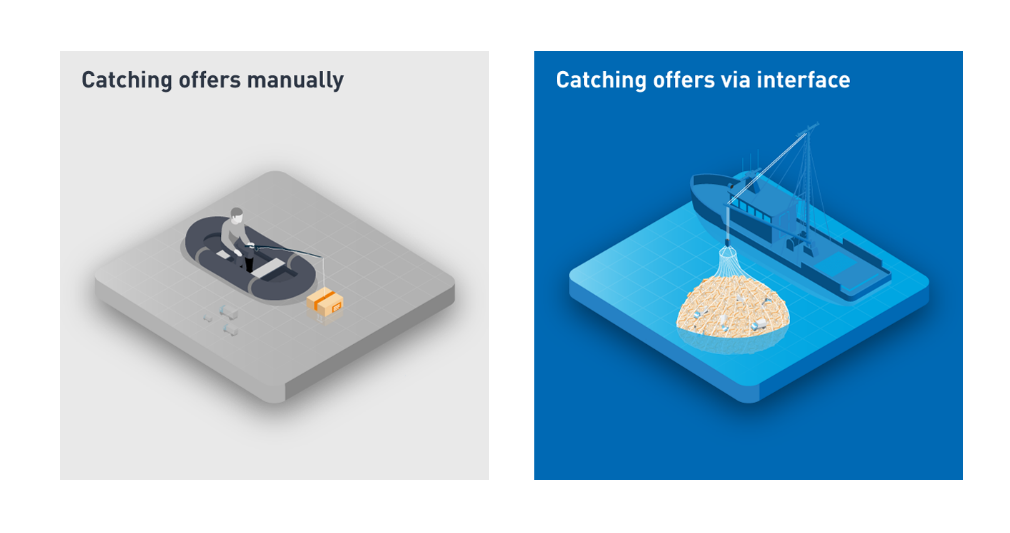
Integration recommendations per API
API Freight Exchange
-
API Freight Exchange (module: Offers)
Send freight and vehicle space offers from the partner system to the TIMOCOM Marketplace
- Create offers
- Edit offers
- Delete offers
Click-and-transmit
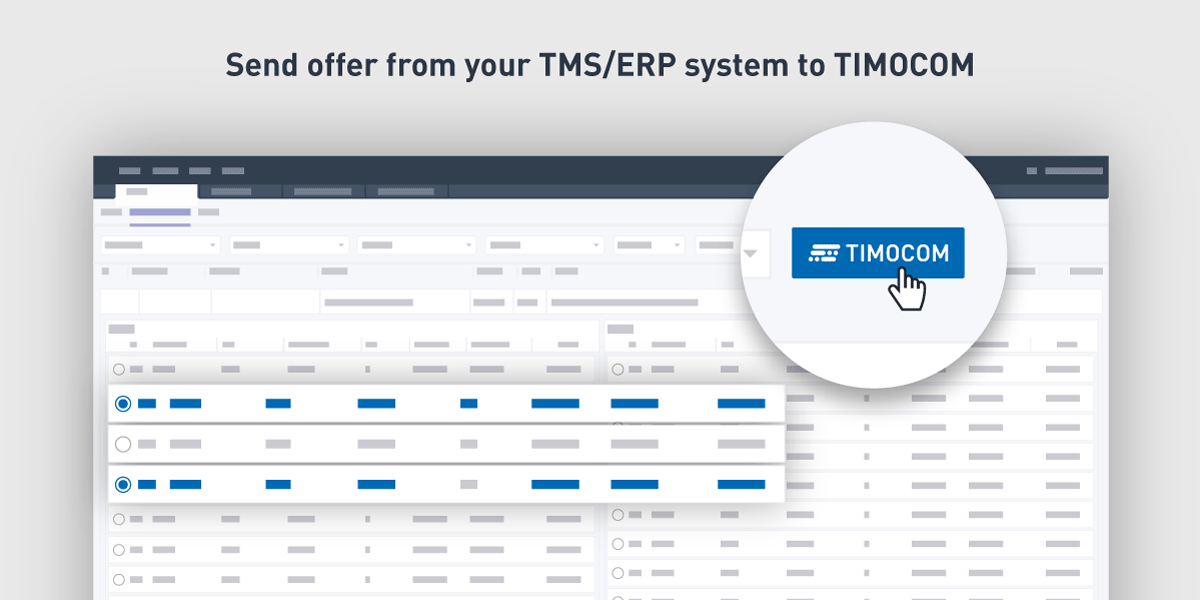
The most important issue concerning the Offer module, is the correct mapping of the information in the transmitted fields, i.e., that the right information from the Partner’s system is shown in the Marketplace. We recommend having a “One-Click-Solution”/“Click-and-transmit”. An example would be to create a button (maybe with the TIMOCOM logo) which a user can simply click on to offer freight or vehicle capacities directly in the TIMOCOM Marketplace.
Zip code concealing
We see the need of “concealing” some parts of the offer transmitted e.g., the postcode of the loading place can be modified so the company where the goods will be collected is not revealed. This feature could be supported by a random generator.
Multi stop tour
In the context of offering freights we recommend thinking about a way to transmit a tour containing multiple part loads that result in a complete tour. In this context the feature called multi-stop tour is beneficial.
Multi select
We also recommend a multi-select function which makes it possible to upload several freight/vehicle space offers at the same time.
Automatic transfer of offers
If possible, the Partner’s system can also transmit offers based on a parameter/logic, e.g., all FTL-shipments in a specific route are always offered as soon as they are entered in the Partner’s system, or all shipments not assigned to a carrier/subcontractor. Furthermore, it is useful to give the option to select multiple offers and to transmit them together instead of each one separately.
Price proposals
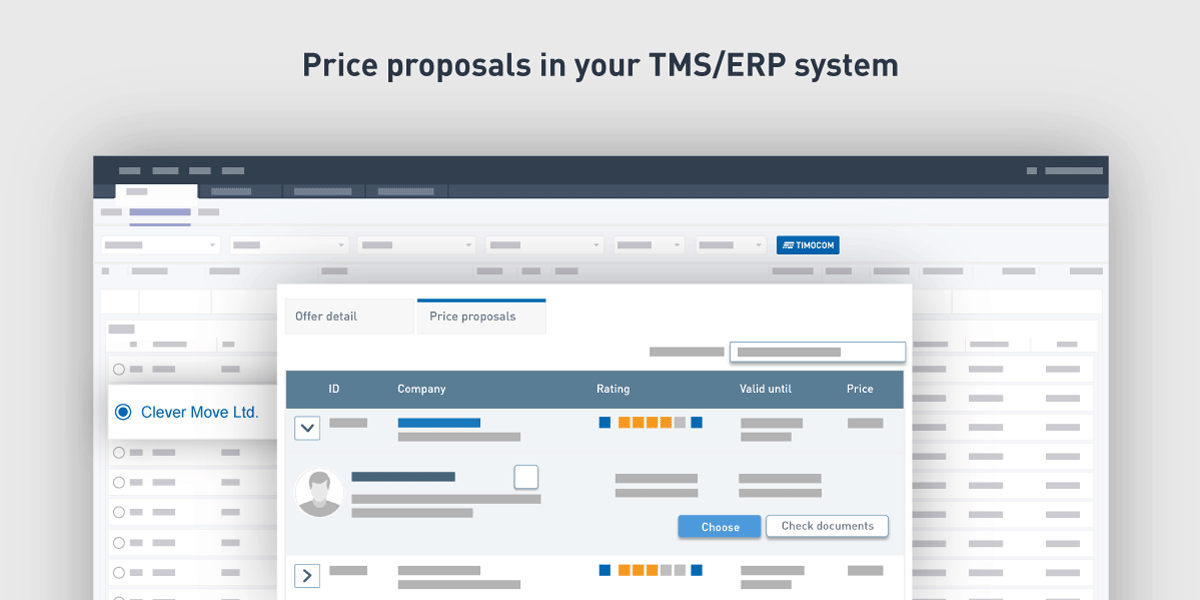
When it comes to negotiating freight offer prices, various communication channels (telephone, e-mail, Messenger) are currently being used, which is very time-consuming and inefficient for both parties. In order to simplify the communication, the new feature makes it possible to receive bids directly in the offer. All price proposals for an offer can then be shown in a list, which, in addition to the price, TIMOCOM ID and the company, contains further information such as the company rating (in a later development step) and in which country the company is located.
The bidder has the possibility to comment on their price proposal, or to withdraw it and submit a new proposal. Based on the decision of the client, the bidder also receives feedback on their bid (acceptance or rejection). With the help of this feature, it is possible to choose from the most attractive price proposals and all offer-related price proposals are displayed at a glance (needs to be implemented by the system provider). It is also possible to import the master data of the service provider into a transport management system and additionally check and download carrier-related documents (e.g. EU licence, letter head and insurance documents). The feature also provides transparency by showing which service provider has been awarded the contract (compliance advantage), and due to transmitted TIMOCOM IDs, it is ensured that only registered service providers have submitted price proposals.
Marking transmitted offers
A flag next to the shipments/vehicle space offers transmitted in the Partner’s system could be used as indicator or a list could be created where the user can see all transmitted offers and can also edit or delete them. This is especially important for the user to keep an overview if the user is working on many different orders at the same time.
Deletion of offers
We recommend using automatic deletion of old offers, e.g., every day in the morning at a specific time or as soon as the freight has been assigned/the transport order has been sent (Suggestion: By assigning a TIMOCOM ID to the offer and submitting a transport order, you can transmit the job to the carrier directly and import the company and contact details). Usually, the offers are deleted at midnight once the loading date has passed (this is the case in the Marketplace) but could also be implemented into the Partner’s system, e.g., after a status is set (“assigned” e.g.).
Searching and offering at the same time
Searching for and offering at the same time is an option that should be considered to increase success in the Smart Logistics System. That is, to offer freight and search for adequate vehicle capacity in parallel or to offer vehicle space and search for the right freight offer. A combination is therefore always recommended. More information can be found in the next chapter.
-
API Freight Exchange (module: Search)
Receive appropriate freight and vehicle space offers from the TIMOCOM Marketplace in the partner system
- Send search queries
- Receive offers with the following information:
- Complete (offer, company, contact information)
- Partly anonymised (offers, company information)
- Anonymised (offer information)
Intelligent search for freight/vehicle space based on specific parameters
The Freight exchange search API can be used to automate the search for freight/vehicle space. The idea is to automate the user’s manual search procedure, i.e., it is a search based on specific parameters.
Note: generic searches (e.g., all freight offers within Germany) are only allowed once permission has been granted by TIMOCOM. The need for such searches must be explained by the customer.
The implementation of the Freight exchange search API function requires a high degree of adaptation of the partner system’s front-end. One option is to just copy TIMOCOM’s Smart Logistics System window (search options) and implement them in your system. The second option is to create an intelligent algorithm with defined search parameters to get the needed offers (see picture for basic automation ideas).
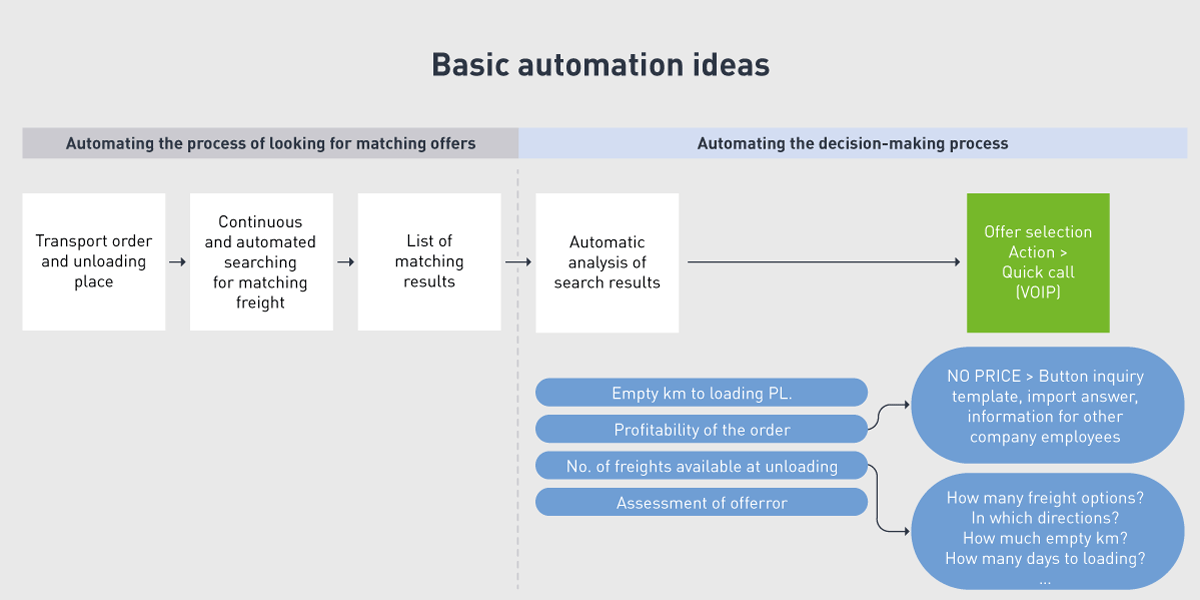
On the one hand, the possible available vehicle capacities shown are based on the freight offers in the Partner’s system. On the other hand, freight offers are displayed, based on own (partially empty) vehicle capacities (GPS is often used) or even based on the schedule of the truck, e.g., checking the next unloading place in the transport order. This leads to intelligent return load searches already days before unloading. In other words, a “return load availability” indicator could be implemented.
A further indicator could be “margin-based”, i.e. based on historical data on transport profits. In that case the system could recommend taking a load from Berlin to Munich instead of Berlin to Stuttgart e.g. First discussions are taking place concerning the “EU Mobility Package”, especially regarding cabotage and the cooling-off period, which are integrated in the planning algorithms. A major haulier asked to check the hometown of the driver (master data in the Partner’s system) to see if he could take loads with unloading places within a area of 15 km from his hometown. This way the driver can stay with his family at weekends.
2-step search
The freight search API is a 2-step approach, i.e., a first search provides up to 30 anonymised offers. By clicking on an offer, the details needed to contact the business partner are shown. In this regard, a counter, counting the number of look-ups, makes sense since customer offers are often based on contingents. With the counter the customer gets an overview of the already used contingent and the information can be used for invoicing.
Please note that within the first step of the search only the following information should be displayed:
• Company name
• TIMOCOM ID
• VAT no.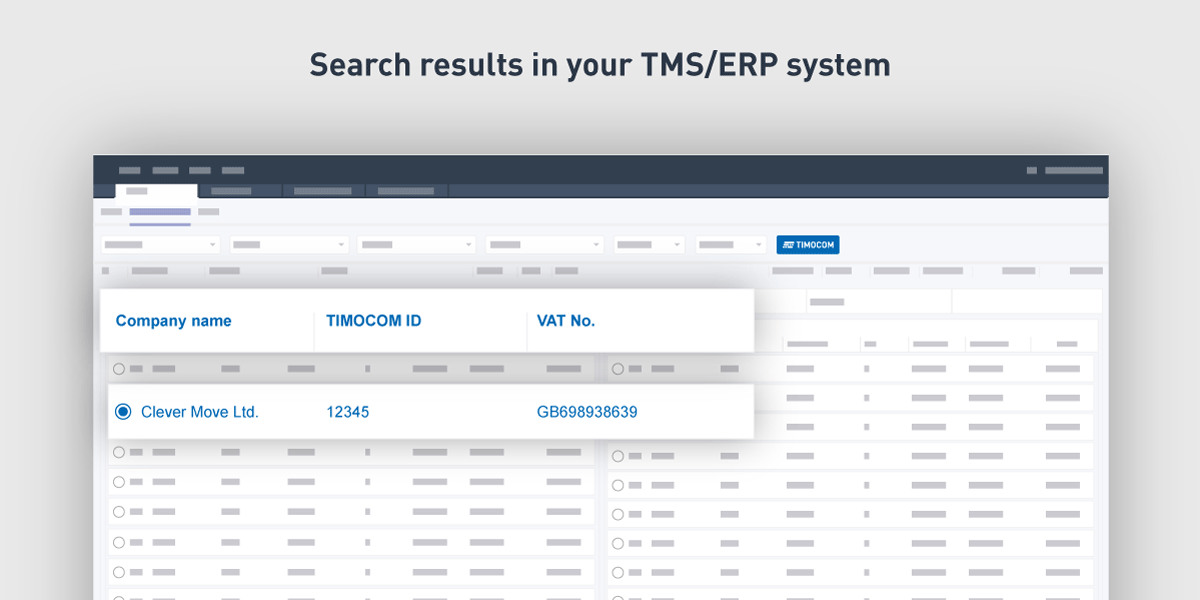
With the help of this data you will be able to clean up the list of offers, e.g. to filter out offers from undesirable companies (companies with a bad credit rating), or you can create your own exclusion list (maintained/saved in a transport management system) for companies you do not want to work with. Additionally, you can also highlight companies you prefer to work with.Within the second step of the search the complete contact information will be displayed such as:
• Dispatcher contact details (name, email, phone no.).
• Address information.
• Homepage.
• Company phone number.
• Company e-mail address.
• Company fax number.
• Different/additional postal address.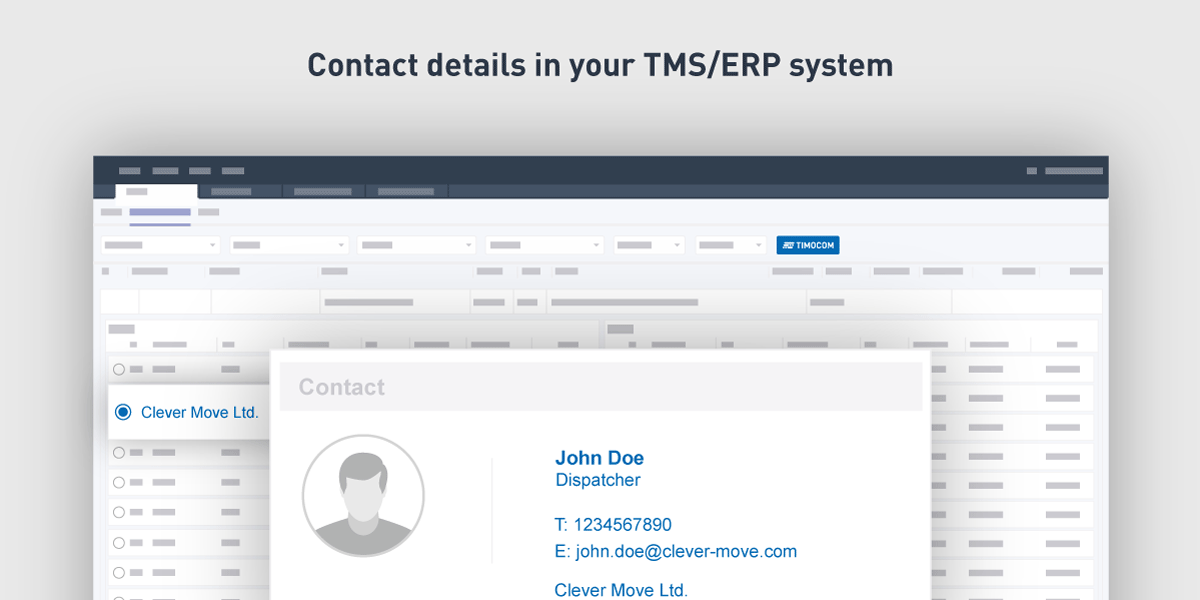
Map based display of search results
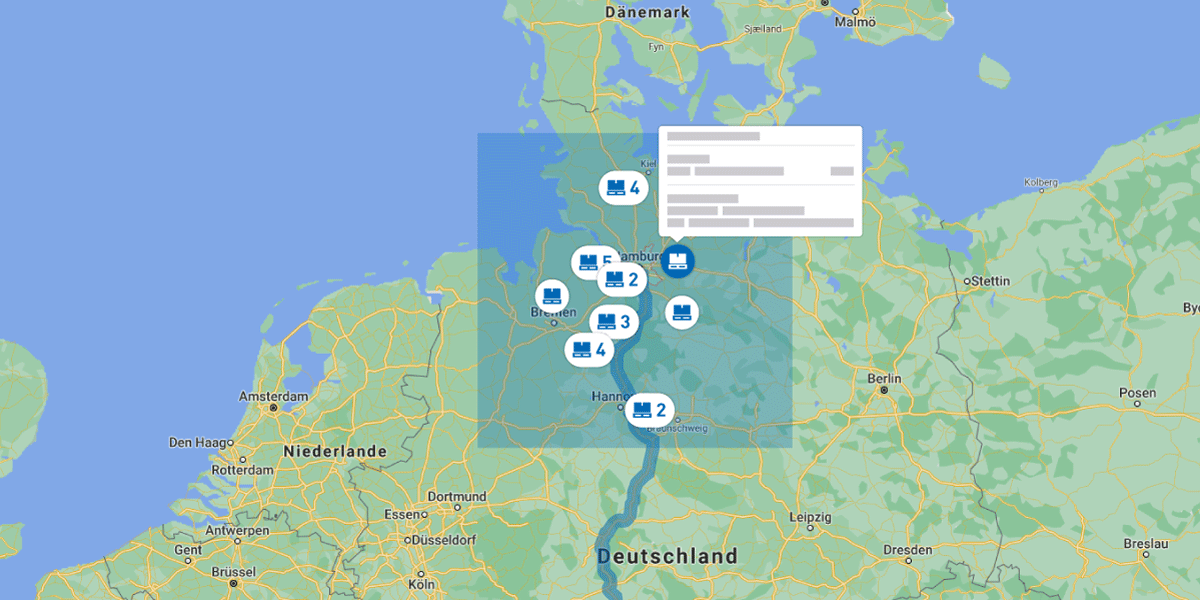
We recommend implementing a map showing the possible freight offers or vehicle capacities and for the details to be displayed when clicking on a symbol on the map. Please bear in mind that you need a map provider such as Here or Google and this could lead to further complexity in the integration or needed licences. If a map is not possible, a list of offers would be an alternative and could be upgraded updated by a status-display system, i.e., to mark favourite offers and to set a working status such as e.g., “contacted” / ”negotiating” / “price offer made” / “price agreed”. The named status are just examples/suggestions, they need to be created in the Partner’s system. Generally, returned anonymous offers also contain a deeplink which refers to the Smart Logistics System, i.e., it is not necessary to show any details in the Partner’s system.
Example of using a map (see picture): A map shows the possible freight offers in a 30 km area around the truck’s unloading place in Hamburg. By clicking on the symbol, freight details are shown.
Connecting phone software and e-mail client
An upgrade of the search-details window could be to connect to the customer’s phoning software/ e-mail client so that the offering business partner can be contacted directly without leaving the system.
Quotes for freight
In order to make the initial contact with a client much easier we recommend to use the Quotes feature. Instead of having time-consuming e-mail exchanges and telephone calls you can easily submit quotes for corresponding offers. Using this feature will help you save time and provides clarity when planning your capacities.
Avoiding empty runs
The search can also be connected to a tour plan of the customer’s vehicles, i.e., freight offers are specifically searched for to fill in empty gaps (empty runs), in the weekly/monthly plan. Further developments could be to create roundtrips, combining the received freight offer with existing tour schedules or to fill empty space on the truck by searching for freight along the current route.
Reservation function
We also recommend a reservation function in your system in the case that several users use the Smart Logistics System at the same time. To avoid various users contacting the provider of the freight/vehicle, the offers can only be opened by one user or only shown to one user. Alternatively, an error message could be implemented informing that user X has already opened the specific offer with ID XX.
Note: Data can only be saved in your system during the negotiation and if the transport has been agreed and a transport order is created. Otherwise, it needs to be deleted. This transport order could be automated by using our Transport orders API (see below). If the transport is not done, the data needs to be deleted latest on the day of loading. Please bear the contractual clauses in mind.
API Transport Orders
-
API Transport Orders
Send transport orders from the partner system to the TIMOCOM Marketplace (transport customer role)
- Send orders
- Cancel orders
- Retrieve and receive messages if order has been accepted, declined or cancelled
- Retrieve, match and store service provider data (company name, address, tax ID)
Receive transport orders from the TIMOCOM Marketplace in the partner system (service provider role)
- Retrieve and receive orders
- Accept, decline, cancel orders
Ideally both transport parties work with the TIMOCOM Marketplace and their systems have a Transport orders API integration. In this case the exchange of legally binding transport orders can be done via API, sending transport orders automatically and receiving them on the other side directly in the other connected system.
If this is not the case the receiving party can work on the transport order directly to TIMOCOM. E-mail exchange would no longer be necessary with the integration and all transport orders are displayed transparently in the Partner’s system or the Marketplace.
The Transport orders API can be used for all transports and not only those within the Marketplace. It allows you to make use of the huge customer database with TIMOCOM IDs to send transport orders automatically, receive status messages and/or POD(s).
API Shipment
-
API Shipment
Receive shipment data from TIMOCOM to import to your ERP or TMS-System.
- Search for shipments.
- Receive status update for shipments.
- Receive position of vehicle (GPS).
- Receive update for freight data, e.g. when amount of pallets has changed.
- Receive update for loading and unloading address.
- Receive update for documents.
- Receive public link for third parties.
Update shipment data from an existing order/shipment from your ERP or TMS System.
- Update shipment freight data.
- Update shipment loading or unloading address
- Update required vehicle.
- Add documents to shipment.
Digital twin
Using the API Shipment allows you to keep an eye on the operational execution of your shipments and to communicate efficiently with your business partners before and during the transport. The Shipment Tracking application provides a digital twin of the shipment to which all parties involved (shipper, forwarder, carrier) have access and via which they can share information about the shipment with each other. Core information of the shipment are status information on the progress of the transport, indication of ETA and the exchange of shipment-related documents such as a proof-of-delivery.
Status information
8 statuses can be set for each shipment. Below you will find a list of the available status information:
- Vehicle on its way to loading place.
- Vehicle arrived at loading place.
- Loading has begun.
- Loading is completed.
- Vehicle on its way to unloading place.
- Vehicle arrived at unloading place.
- Unloading has begun.
- Unloading is completed.
Geofencing
In addition to this, it is possible to send loading and unloading status messages via geofencing. The following statuses can be set automatically:
- Vehicle arrived at loading place.
- Loading is completed.
- Vehicle arrived at unloading place.
- Unloading is completed.
Providing ETA
From the loading place to the delivery of the shipment at the unloading place, the progress can be documented in single steps. Of course, there is always a time stamp in addition. The corresponding vehicle can be added to each shipment. This way the shipment is linked with the GPS positions, and thus customers can see the real-time status of their shipment (i.e. the exact location of the vehicle in relation to the loading/unloading place). With the help of this information, it is possible to calculate an ETA. With this expected time of arrival, customers can optimize their processes, e.g. the handling sequence of trucks at the ramp, or staff planning.
Working efficiently
Implementing the API Shipment normally requires implementing the API Transport Order at the same time. By making both APIs available you can ensure that users can work in their own transport management system with high efficiency, without having to switch between different systems or applications. Using these APIs allows you to exchange data with your business partners irrespective of whether they also use the API or our standard web application.
API Tracking
-
API Tracking
Enable access to the position data of GPS devices (trucks, trailers, etc.) for further use in the transport process.
- Retrieve approved GPS devices
- Retrieve own GPS devices
- Grant permission to third parties
Ideally, retrieved GPS information is shown on maps so you have an overview of the regularly used vehicles of your subcontractor(s) (permanent permission) or for single transports. The advantage of the API is the possibility to view data from more than 286 different telematic systems on one map – and the number of systems is increasing.
Since the exchange of data is possible in both directions, so too is the tracking permission granted so that other TIMOCOM users can see your trucks. We recommend integrating this option directly in the fleet management/vehicle details, to create a list of the vehicles with tracking permission granted to others or to even mark the vehicles in a certain colour (internal status in your system could be an alternative).
Beside the APIs, an integration of the transport barometer would be a good option. The barometer gives a good indication of the current market situation and can be adopted based on the country route of the offer/vehicle.
Update Process
The APIs are constantly being improved and further developed. As soon as new versions are available an updated documentation is sent to the Partner.
If changes to one of the TIMOCOM APIs require an update of the front-end/change in the agreed implementation, the Partner must provide a screenshot or online presentation of the changes in the system so it can be approved by the TIMOCOM Product Management and/or Partner Management.
Checklists for final approval
Generally:
Topic |
Must |
Should |
|
Which of the APIs are implemented? |
x | |
|
Is the implemented solution user-friendly and therefore easy to use? |
x | |
|
Is a TIMOCOM logo / branding integrated? |
x | |
|
Explain the use / storage / deletion of data |
x | |
|
Communication process – any indication of spam mailing |
x | |
|
Data retrieval interval / explain the time settings |
x |
API Freight Exchange (module: Offer)*
*Please note that following evaluation is based on best practices, customer feedbacks and our recommendations for a proper API integration
Topic |
Must |
Should |
| Create, edit, delete offers |
x |
|
| Zip code concealing | x | |
|
Multi stop tour |
x |
|
|
Multi select |
x | |
| Automatic transfer of offers |
x |
|
|
Quotes for freight |
x |
|
|
Marking transmitted offers |
x |
|
|
Searching and offering at the same time |
x |
API Freight Exchange (module: Search)*
*Please note that following evaluation is based on best practices, customer feedbacks and our recommendations for a proper API integration
Topic |
Must |
Should |
| Searching for freight/vehicle space based on specific parameters | x
|
|
| 2-step search function | x | |
| Map based display of search results | x | |
| Area search | x | |
| Multiple search |
x |
|
| Connecting phone software and e-mail client | x
|
|
|
Quotes for freight |
x |
|
| Searching for return loads/additional loads |
x |
|
|
Searching for freight along planned route |
x |
|
|
Reservation function |
x |
API Transport Order*
*Please note that following evaluation is based on best practices, customer feedbacks and our recommendations for a proper API integration
Topic |
Must |
Should |
| Sending, Canceling transport orders | x | |
| Retrieving and receiving order-related messages | x | |
| Storage of service provider data | x | |
| Retrieveing and receiving transport orders | x | |
| Accepting, rejecting and canceling transport orders | x |
API Shipment*
*Please note that following evaluation is based on best practices, customer feedbacks and our recommendations for a proper API integration
Topic |
Must |
Should |
| Receiving shipment data | x | |
| Updating shipment data | x | |
| Status information |
x |
|
| Automated status messages via geofencing |
x |
|
| Calculation of estimated time of arrival (ETA) |
x |
|
|
Document management |
x |
API Tracking*
*Please note that following evaluation is based on best practices, customer feedbacks and our recommendations for a proper API integration
Topic |
Must |
Should |
| Retrieving approved GPS devices | x |
|
| Retrieving own GPS devices | x | |
| Granting permission to third parties |
x |
|
| Map-based display | x |
Contact us
Please contact your partner manager to discuss any integration topics.